# OCI Email Delivery
URL: https://openship.io/docs/guides/email-webmail/relay-oci.md
Route your Openship mail server's outbound mail through Oracle Cloud (OCI) Email Delivery — free tier, good IP reputation, no PTR chores.
import { Step, Steps } from 'fumadocs-ui/components/steps';
Oracle Cloud's **Email Delivery** service is a solid pick for an [SMTP relay](/docs/guides/email-webmail/relays):
it's free for the first 3,000 emails a month, and because your mail leaves from Oracle's own IP addresses (not a
brand-new cloud IP nobody trusts yet), inbox providers are far less likely to bounce or spam-folder it.
- An **OCI account** (Oracle's free tier covers this).
- A **domain name** you control, where you can add DNS records.
- An **Openship mail server** already set up. If you haven't done that yet, start with
[Email & webmail](/docs/guides/email-webmail) — you'll need it running before there's anything to relay.
## Setup at a glance
### Create an Email Domain and add the DKIM records
In OCI Email Delivery, create an **Email Domain** for your domain. OCI generates DKIM DNS records for it — add
those at your domain's DNS provider. DKIM is a cryptographic signature that receiving mail servers use to
confirm a message really came from your domain, so this step is what makes the rest of the setup trustworthy.
### Add the SPF record
Add the SPF record from [OCI's SPF guide](https://docs.oracle.com/en-us/iaas/Content/Email/Tasks/configurespf.htm)
at your domain's DNS provider. It's a one-line TXT entry that tells the world "Oracle's relay is allowed to send
mail on behalf of this domain" — without it, receiving servers have no way to know Oracle is a legitimate sender
for you.
### Register your approved senders
OCI refuses to relay mail from any From address it doesn't recognize, so register the addresses you'll send
from as **approved senders** — either a specific address, or `@yourdomain.com` to cover the whole domain at
once (only available once DKIM is active). Do this in the OCI Console (navigation menu → **Developer Services**
→ **Email Delivery** → **Approved Senders** → **Create Approved Sender**), or from the CLI:
```bash
oci email sender create --email-address you@yourdomain.com ...
```
### Create SMTP credentials
Create SMTP credentials for an IAM user: OCI Console → **Identity** → **Users** → **SMTP Credentials**. The
password is shown to you exactly once, so copy it somewhere safe the moment it appears — there's no way to
view it again later.
### Point Openship's relay at OCI
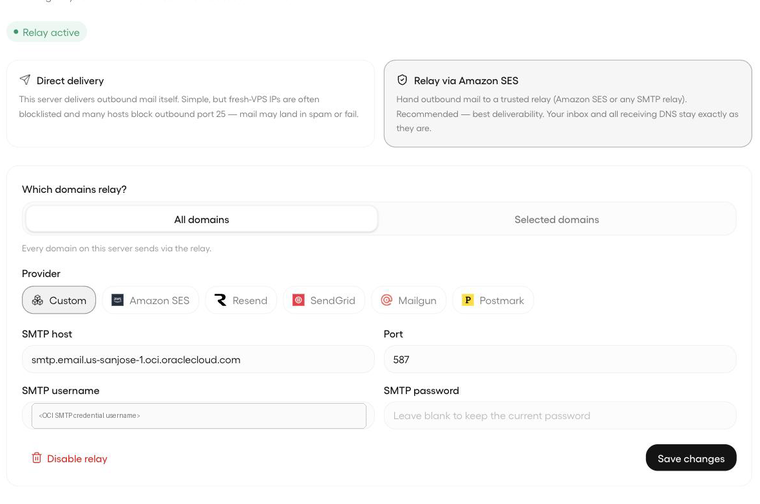
In Openship, go to **Emails → Sending → "Relay via Amazon SES (or any SMTP relay)"** and choose provider
**Custom**. Fill in:
- **Host** — `smtp.email..oci.oraclecloud.com` (swap in your OCI region)
- **Port** — `587`
- **Username / Password** — the SMTP credential you just created
The same host, port, and credential also work under **Settings → Email**, if you'd rather relay Openship's own
notification emails through OCI too.
 ## Gotchas / good to know
- **Approved senders are mandatory, not optional.** OCI's own docs put it plainly: "An approved sender must be
set up for all From: addresses sending mail through Oracle Cloud Infrastructure, or mail is rejected" ([OCI
docs](https://docs.oracle.com/en-us/iaas/Content/Email/Tasks/managingapprovedsenders.htm)). Register each
address individually, or — once DKIM is active for the Email Domain — register the whole domain at once with
an approved sender of the form `@yourdomain.com` ([OCI
docs](https://docs.oracle.com/en-us/iaas/Content/Email/Reference/gettingstarted_topic-Create_an_approved_sender.htm)),
which covers every mailbox in one shot.
- **The SMTP credential password only appears once.** The OCI Console shows it at creation time and never
again — if you lose it, the only fix is regenerating a new one.
- **Port 25 is blocked by default, and that's fine.** OCI blocks outbound port 25 on tenancies created after
June 2021. You can request a service-limits exemption if you need it, but relaying through OCI's SMTP relay on
port 587 sidesteps that wait entirely — and as a bonus, your mail leaves from Oracle's well-reputed IPs
instead of a fresh cloud IP that inbox providers are naturally suspicious of.
- **You can skip the PTR chore.** PTR (reverse DNS) is the record that maps a server's IP back to a hostname,
and large mail providers often junk mail from IPs that don't have one. Because your outbound mail actually
leaves through Oracle's relay IPs — which already have proper PTR records — your own instance's IP never
needs one.
## Gotchas / good to know
- **Approved senders are mandatory, not optional.** OCI's own docs put it plainly: "An approved sender must be
set up for all From: addresses sending mail through Oracle Cloud Infrastructure, or mail is rejected" ([OCI
docs](https://docs.oracle.com/en-us/iaas/Content/Email/Tasks/managingapprovedsenders.htm)). Register each
address individually, or — once DKIM is active for the Email Domain — register the whole domain at once with
an approved sender of the form `@yourdomain.com` ([OCI
docs](https://docs.oracle.com/en-us/iaas/Content/Email/Reference/gettingstarted_topic-Create_an_approved_sender.htm)),
which covers every mailbox in one shot.
- **The SMTP credential password only appears once.** The OCI Console shows it at creation time and never
again — if you lose it, the only fix is regenerating a new one.
- **Port 25 is blocked by default, and that's fine.** OCI blocks outbound port 25 on tenancies created after
June 2021. You can request a service-limits exemption if you need it, but relaying through OCI's SMTP relay on
port 587 sidesteps that wait entirely — and as a bonus, your mail leaves from Oracle's well-reputed IPs
instead of a fresh cloud IP that inbox providers are naturally suspicious of.
- **You can skip the PTR chore.** PTR (reverse DNS) is the record that maps a server's IP back to a hostname,
and large mail providers often junk mail from IPs that don't have one. Because your outbound mail actually
leaves through Oracle's relay IPs — which already have proper PTR records — your own instance's IP never
needs one.